

How this works
How to get a Google review link and where to put it
How to get a Google review link in under a minute from your Business Profile, the QR code that comes with it, the rules for asking, and where a trade puts it.
Open your Google Business Profile on a computer, select Read reviews, then Get more reviews. Copy the link, or right-click the QR code and save it. That is the whole of it, it is free, and it is the same link every generator tool on page one of Google would sell you.
The harder part is what you do with it, and the rules Google puts on asking.
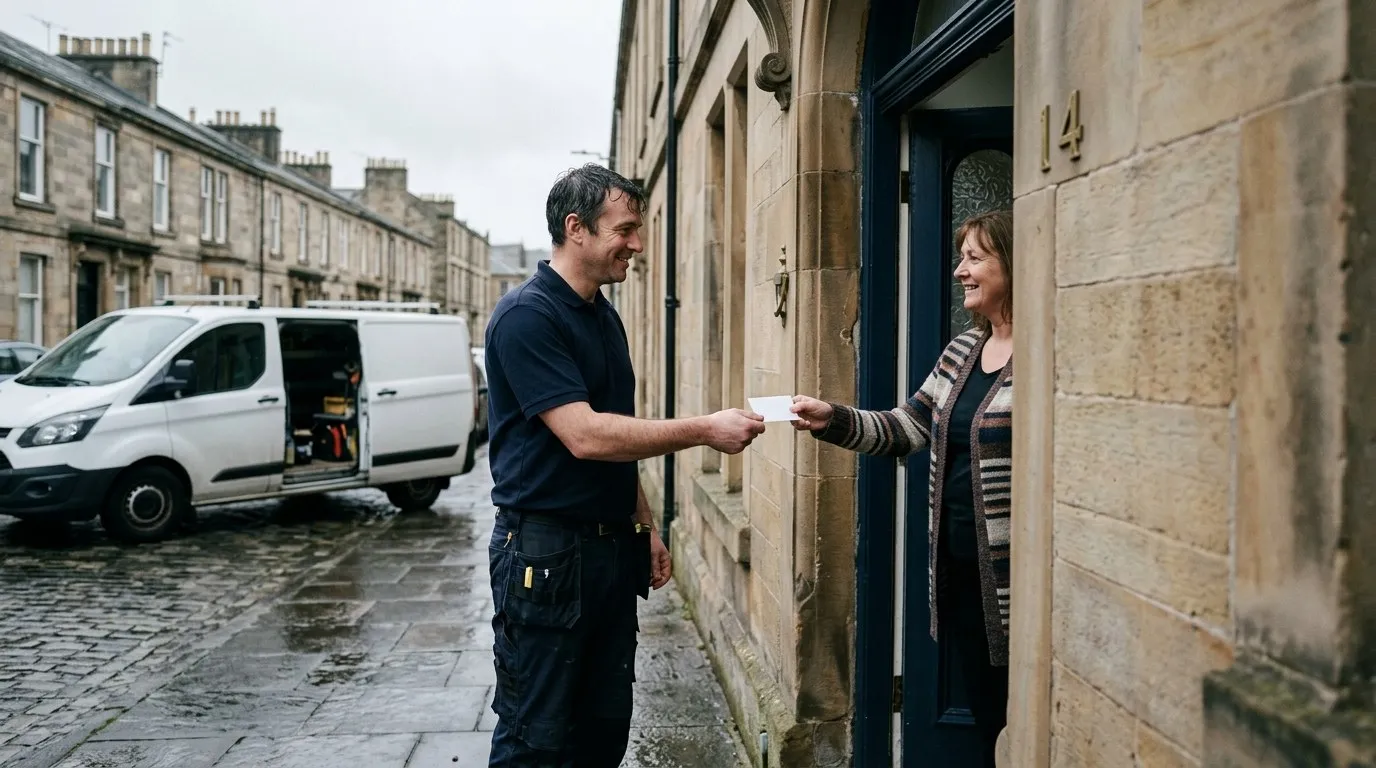
The ask happens at the door, when the job is fresh. The link makes it a ten second job for them.
Where the Google review link is
Google’s page on creating a review link or QR code gives the steps, and there are only three.
- Go to your Business Profile on a computer, signed in as the owner or a manager.
- Select Read reviews, then Get more reviews. It has a share icon next to it.
- Copy the link with the copy icon, or right-click the QR code and choose Save image as.
The QR code is the one catch. Google says reviews QR codes can only be generated on a computer browser, not on mobile devices. The link itself you can find and share from the phone, but if you want the code for the van or a card, do it once from a laptop and keep the file.
Two things the customer needs: a Google account, because Google says they must be signed in to leave a review, and about a minute. The link opens straight onto the star rating, so nobody has to find you on the map first. That is the entire point of it.
Do you need a review link generator?
No. The top of the search for this phrase is full of free generator tools and they all produce the same link Google gives you in the profile. The only reason to use one is if you do not have access to the profile, and if that is your situation the fix is getting access, not working around it. A profile that somebody else owns is a bigger problem than a missing link.
The rules for asking, from Google
Asking is allowed. Google’s own advice on getting reviews says you can ask customers to visit a Google link or scan a QR code. Two things are not allowed, and they are the two things people get sold.
- No incentives. Google says offering free or discounted goods or services in exchange for reviews is considered fake engagement and is strictly prohibited. A tenner off for a review can cost you every review on the profile.
- No picking who you ask. Google’s Maps content policy says a business must not discourage or prohibit negative reviews, or selectively solicit positive reviews from customers. Ask everyone, or the reviews stop being reviews.
The cause and effect is simple. A review that was paid for is not a genuine experience, Google filters what it thinks is not genuine, and a profile that looks like it is gaming reviews is a profile that gets suspended. Nothing on this page is worth a suspended profile.
Ask every customer, the same way, with no reward attached. That is the rule, and it also happens to be the routine that works.
Where a trade should put the link
Google’s list is receipts, thank-you emails, the end of a chat, and on display in a shop. A trade business does not have a shop and rarely sends a thank-you email, so here is the version for a van.
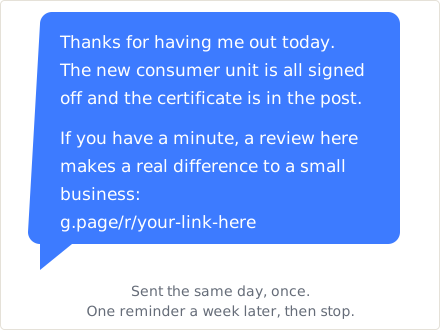
The words are yours to change. The timing is the part that matters.
- The text with the invoice. Same day, one message, link at the end. This is where most reviews come from, because the customer already has the phone in their hand to pay you.
- The invoice footer. One line and the link. Costs nothing, catches the ones who pay a week later.
- A card on the worktop. The QR code and one sentence. It works for the older customer who does not do links in texts.
- The back door of the van. The QR code at eye level. It gets fewer scans than you would hope and it is still free.
| Where | When | Who does it |
|---|---|---|
| Text with invoice | Same day | Whoever sends invoices |
| Invoice footer | Every invoice | Set once |
| Card on the worktop | Leaving the job | Whoever is on site |
The routine that actually gets reviews
The link is the easy part. Reviews come from a habit, and the habit is dull.
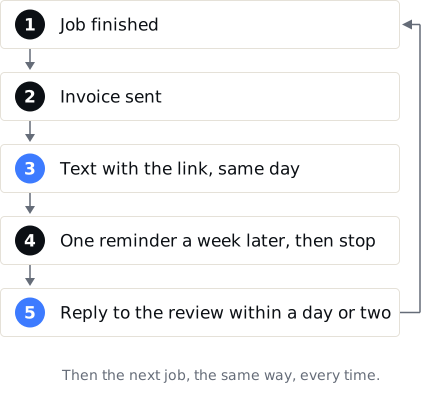
One person owns the routine. If it is everybody’s job it is nobody’s.
- Every job, no exceptions. The moment you start picking, you are breaking Google’s rule and you are also picking wrong, because the customer you thought was unhappy often is not.
- The same day. A week later the job is old news. The same evening it is the thing they are telling people about.
- One reminder, then stop. A second text a week on is fine. A third is a nuisance and it reads as one.
- Reply to every review within a day or two, which is its own short set of rules.
What the reviews are worth once you have them
Reviews are worth about 16 to 20 per cent of what decides the map pack, according to the Whitespark Local Search Ranking Factors survey for 2026, and they are one of the few parts you control. The biggest part, proximity, is about 55 per cent and nobody controls it.
In miles, which is how it actually lands: when I measured 40 UK towns from 49 points each, businesses leading the map with under 10 reviews held a top three placement out to a median 0.71 miles, and with 150 or more reviews, 1.84 miles. Reviews roughly doubled the reach. They did not take anyone across a town, and no routine will.
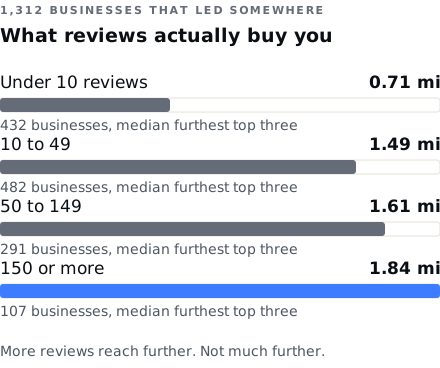
1,312 businesses that led a map somewhere, by review count, from 40 UK geogrids in August 2026.
That doubling is real, it is permanent, and it is yours rather than rented from a directory. The link takes a minute to get. The routine takes a text a day. Where that fits in the rest of getting found is on the SEO for tradesmen page.